


Troubleshooting a non - working kid's headset can be a frustrating experience, especially when your child is eager to use it. As a supplier of kid's headsets, I've encountered various issues over the years and have developed a comprehensive guide to help you diagnose and fix these problems.
1. Initial Checks
Before diving into complex troubleshooting, start with some basic checks. First, ensure that the headset is properly connected. If it's a wired headset, make sure the plug is securely inserted into the audio source, whether it's a smartphone, tablet, or computer. A loose connection can often lead to no sound or intermittent audio.
If it's a wireless headset, check the power status. Most wireless headsets have an LED indicator that shows whether they are on and paired. Make sure the headset is turned on and that the battery is charged. A low - battery condition can cause the headset to malfunction. You can try charging the headset for a few hours and then testing it again.
2. Audio Source Issues
Sometimes, the problem isn't with the headset itself but with the audio source. Check the volume settings on the device the headset is connected to. Ensure that the volume is turned up and that the mute function is not enabled. You can also try playing different audio files or apps to see if the issue persists. For example, if you're trying to listen to music and there's no sound, try playing a video or a system sound.

If you're using a smartphone, check if the audio output is set to the headset. Some devices may default to the built - in speakers even when a headset is connected. You can usually change this setting in the device's audio or sound settings.
3. Wireless Pairing Problems
For wireless headsets, pairing issues are a common cause of non - functionality. If the headset is not paired correctly with the audio source, it won't receive the audio signal. To troubleshoot this, put the headset into pairing mode. The process for entering pairing mode varies depending on the model, but it usually involves pressing and holding a specific button until the LED indicator starts flashing.
On the audio source, go to the Bluetooth settings and search for available devices. Select the kid's headset from the list of available devices and follow the on - screen instructions to complete the pairing process. If the pairing fails, try restarting both the headset and the audio source. Sometimes, a simple restart can clear up any temporary glitches.
If the headset still won't pair, check if the audio source supports the Bluetooth version of the headset. Some older devices may not be compatible with newer Bluetooth standards. You can also try moving the headset and the audio source closer together, as interference or distance can affect the pairing process.
4. Physical Damage
Inspect the headset for any physical damage. Check the cables for cuts, frays, or breaks. If you notice any damage to the cable, it may need to be replaced. You can try using a cable tester to determine if the cable is the source of the problem.
Examine the ear cups and the headband for any signs of wear or damage. Loose or broken parts can affect the headset's performance. For example, if the ear cups are not properly attached, they may not fit snugly on the ears, which can lead to sound leakage and reduced audio quality.
5. Software and Firmware Updates
Some headsets may require software or firmware updates to function properly. Check the manufacturer's website for your headset model to see if there are any available updates. Download and install the updates following the provided instructions. Software or firmware updates can fix bugs, improve performance, and add new features to the headset.
6. Microphone Issues
If the headset has a microphone and it's not working, there are several things you can check. First, make sure the microphone is not muted. Some headsets have a dedicated mute button or a function that can be accessed through the audio source's settings.
Check the microphone's position. If it's a clip - on microphone, ensure that it's properly attached and positioned close to the mouth. A microphone that is too far away from the mouth may not pick up the sound effectively.
You can also test the microphone by using a voice recording app on the audio source. Try speaking into the microphone and then play back the recording to see if your voice is captured. If the microphone still doesn't work, there may be an internal issue with the microphone itself, and it may need to be repaired or replaced.
7. Compatibility Issues
Ensure that the kid's headset is compatible with the audio source. Different headsets have different compatibility requirements, such as operating system versions, device types, and audio output standards. For example, some headsets may only be compatible with iOS devices, while others may work with both iOS and Android.
If you're using a headset with a computer, make sure the drivers are installed correctly. You can usually download the latest drivers from the manufacturer's website.
8. Hardware Malfunctions
If you've tried all the above steps and the headset still isn't working, there may be a hardware malfunction. This could be due to a faulty speaker, microphone, battery, or other internal components. In this case, it's best to contact the manufacturer's customer support. They can provide further troubleshooting steps or arrange for repairs or a replacement.
9. Specific Product Troubleshooting
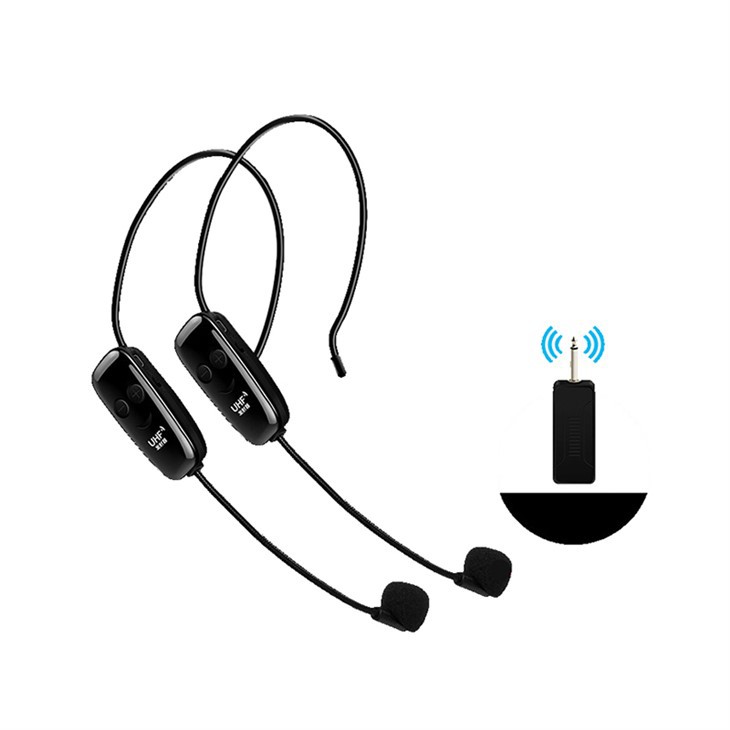
As a supplier, we offer a variety of kid's headsets, including UHF Wireless Headset Microphone, TS - GL61 MINI Clip - on 2.4G Wireless Recording Microphone, and One For Two UHF Wireless Headset Microphone. Each of these products may have unique troubleshooting requirements.
For the UHF Wireless Headset Microphone, if you're experiencing interference or signal loss, try changing the channel on the headset and the receiver. Some environments may have a lot of electromagnetic interference that can affect the UHF signal. You can also try moving the receiver to a different location to see if that improves the signal.
The TS - GL61 MINI Clip - on 2.4G Wireless Recording Microphone is a popular choice for kids who want to record their voices. If the recording quality is poor, check the placement of the microphone. Make sure it's close to the sound source and that there are no obstacles blocking the audio path. Also, ensure that the battery is fully charged, as a low - battery condition can affect the recording quality.
The One For Two UHF Wireless Headset Microphone allows two users to use the same system. If one of the headsets is not working, check the pairing and power status of that specific headset. You may also need to adjust the volume settings on the receiver to ensure that both headsets receive the same audio level.
10. Conclusion
Troubleshooting a non - working kid's headset can be a step - by - step process, but with patience and the right approach, you can often identify and fix the problem. By following the tips outlined in this guide, you can save time and money by avoiding unnecessary repairs or replacements.
If you're in the market for high - quality kid's headsets or need further assistance with troubleshooting, we're here to help. We have a wide range of products to meet your needs, and our team of experts can provide you with personalized advice and support. Whether you're a parent looking for a headset for your child or a retailer interested in stocking our products, we welcome you to reach out for a procurement discussion.
References
- General knowledge of kid's headset technology and troubleshooting from years of experience as a supplier.
- Manufacturer's manuals and support documents for various kid's headset models.


