


Hey there! As a supplier of kids' headsets, I've seen it all when it comes to the wear and tear these little gadgets go through. Kids are full of energy, and their headsets often bear the brunt of their adventures. That's why knowing how to clean a kid's headset properly is super important. Not only does it keep the headset looking good, but it also ensures it functions well for a long time.
First things first, let's gather the supplies you'll need for cleaning. You don't need anything fancy. Just grab a soft, lint - free cloth, some mild soap, and a bowl of warm water. Avoid using harsh chemicals or abrasive cleaners because they can damage the headset's materials.
Now, let's start with the exterior of the headset. Most kids' headsets have a plastic or rubber outer shell. Take your soft cloth and dampen it slightly in the soapy water. Wring it out well so it's not dripping wet. Gently wipe down the entire exterior of the headset, including the headband, ear cups, and any buttons or controls. Pay special attention to areas that get a lot of contact with the skin, like the inside of the ear cups, as they can accumulate oils and dirt over time.
If there are stubborn stains on the exterior, you can use a little bit more pressure, but still be careful not to scratch the surface. Once you've wiped it all down, use a dry part of the cloth to remove any excess moisture. Let the headset air - dry completely before using it again.
Next up is the ear pads. These are where a lot of the grime and sweat can build up. Some ear pads are removable, which makes cleaning a breeze. If yours are removable, take them off the headset. You can hand - wash them in the soapy water. Gently swish them around, then rinse them thoroughly under running water. Squeeze out the excess water gently, and lay them flat to dry. Make sure they're completely dry before putting them back on the headset.
If the ear pads aren't removable, you can still clean them. Dampen your cloth with the soapy water again and carefully clean the surface of the ear pads. Be extra gentle here because you don't want to damage the padding or the fabric. After cleaning, dry them off with a dry cloth and let them air - dry.
Now, let's talk about the microphone. The microphone on a kid's headset can pick up all sorts of things, from food crumbs to saliva. For a wired microphone, you can use a can of compressed air to blow out any loose debris. Hold the can upright and give short, quick bursts of air into the microphone opening. This should dislodge any small particles.
If there's still some gunk left, you can use a cotton swab dipped in a little bit of rubbing alcohol. Gently clean the microphone grille, being careful not to push any debris further into the microphone. For wireless microphones like the TS - GL61 MINI Clip - on 2.4G Wireless Recording Microphone, you need to be even more cautious. Make sure the microphone is turned off and remove the battery if possible before cleaning. Follow the same steps as for a wired microphone, but use a very light touch.
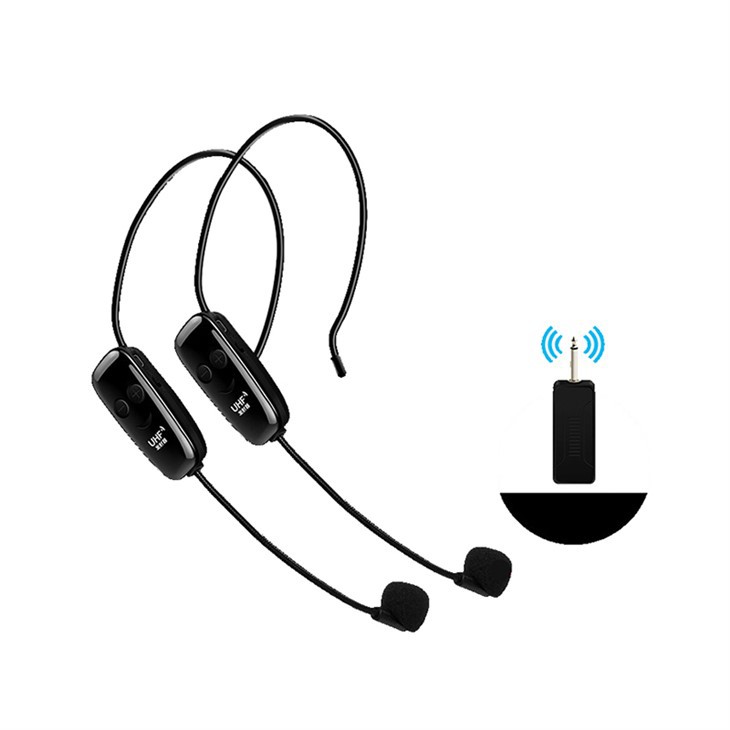
Another great option for kids' headsets is the Rechargeable UHF Wireless Microphone Kit. When cleaning this type of headset, you need to pay attention to the charging ports as well. Use a dry cotton swab to gently clean the inside of the charging port to remove any dust or debris. If there's a lot of dirt, you can slightly dampen the cotton swab with rubbing alcohol, but make sure it's not too wet.
The One For Two UHF Wireless Headset Microphone is also a popular choice. When cleaning this one, make sure to check the connection points between the headset and the receiver. Use the compressed air to blow out any dirt or dust from these areas.
It's also important to clean the cables of the headset. If the headset is wired, the cables can get dirty and tangled. First, untangle the cables gently. Then, use the damp cloth to wipe down the cables. Be careful not to bend or kink the cables too much, as this can damage the internal wiring.
Once you've cleaned all the parts of the headset, it's a good idea to give it a final inspection. Check for any remaining dirt or damage. If you notice any parts that seem worn out or damaged beyond cleaning, it might be time to replace them.

As a supplier of kids' headsets, I know that keeping these products in good condition is essential. A well - maintained headset not only lasts longer but also provides a better experience for the kids using them. If you're in the market for high - quality kids' headsets, we've got a wide range of options to choose from. Whether you need a simple wired headset or a fancy wireless one with all the bells and whistles, we've got you covered.
If you're interested in purchasing our kids' headsets in bulk for your store, school, or any other organization, I'd love to talk to you. Just reach out, and we can discuss the details of your order, pricing, and delivery options. We're committed to providing the best products and service to our customers.
References
- General knowledge on electronic device cleaning
- Manufacturer's guidelines for kids' headsets


